How to Check a Game's Real Average Framerate on Steam Deck Before You Buy It
Valve just added real player framerate data and a histogram to Steam Deck compatibility pages, giving you a clearer read on performance than the Verified badge alone.
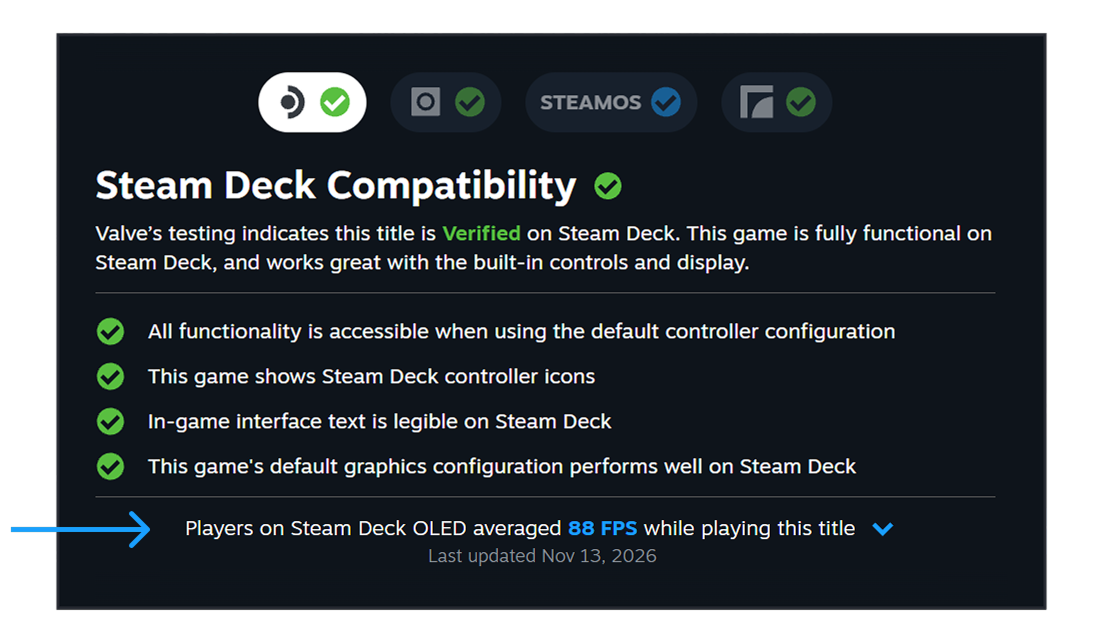
Steam Deck's green "Verified" checkmark has told buyers whether a game runs since 2022, but it has never told them how well it runs for the person actually holding the device. That changed on November 11, 2026, when Valve rolled out real average framerate data, pulled from opted-in Steam Deck owners, directly onto every eligible game's Steam Deck Compatibility card. Here's where to find it, how to read the histogram underneath it, and how to control whether your own play sessions feed the numbers.
What Valve Just Turned On
In a post on the official Steam news hub, Valve confirmed the average-framerate feature is now live "on the store and in the Steam Client (on desktop and on Deck) for everyone," after a period of testing. The number is built from anonymized session data submitted by Steam Deck owners who opted in, and it only appears for games that already carry a Deck compatibility rating of Verified, Playable, or Unsupported. Valve says thousands of games already have enough samples to show a result, and that pool grows as more sessions are reported.
The timing matters for anyone finishing a big Steam library purchase this week: a Verified badge still only means a game is playable with the default controls and a legible interface, not that it holds a comfortable framerate. This update adds the missing performance context on top of that badge instead of replacing it.
Reading the Average and the Histogram
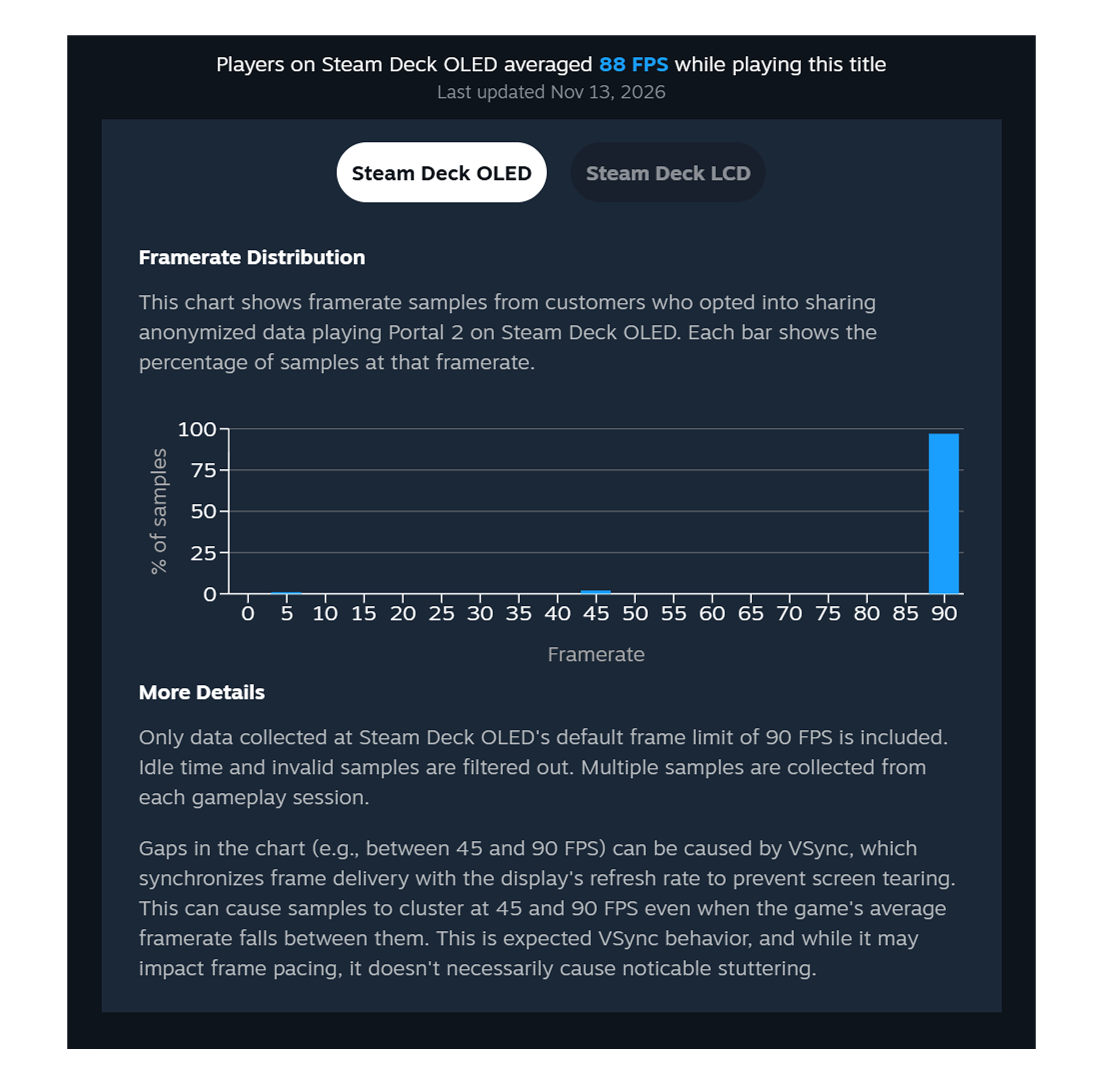
On a game's Steam Deck Compatibility card, a new line under the checklist reads something like "Players on Steam Deck OLED averaged 88 FPS while playing this title." Selecting the dropdown next to it opens a Framerate Distribution histogram that breaks the same data into percentages at each framerate band, so you can see whether that average comes from a steady experience or from a wide spread between low and high frames.
Valve's own example in the announcement illustrates why the histogram matters more than the headline number. For Portal 2 on Steam Deck OLED, the published average also sits near 88 FPS, but the chart underneath shows roughly 95 percent of samples clustered at the console's 90fps frame limit, with only thin slivers around 45fps and 5fps. That shape tells a very different story than an average built from a game that spends equal time at 90fps and 45fps: in Portal 2's case, most sessions are essentially locked at the display's full refresh rate, and the low readings are brief outliers rather than the norm.
Valve's FAQ on the same post explains two things worth knowing before you trust any chart like that. First, only sessions captured at the console's default frame limit count: 90fps on Steam Deck OLED, 60fps on Steam Deck LCD. Custom in-game settings and uncapped framerate modes aren't factored in, and idle time and invalid samples are filtered out. Second, a visible gap in the bars, say a cluster at 90 and another at 45 with nothing between, is normal VSync behavior rather than a bug: Valve's technical note describes a 75fps target on a 90Hz screen producing an alternating 90/90/45 pattern that still averages out to roughly 75, and the same logic explains why a game internally capped at 60fps on Deck OLED can bounce between 90 and 45 instead of holding a flat 60.
Why This Beats the Verified Badge Alone
Valve's own framing for the change is blunt about the old system's limits. The Steam Deck Verified rating is based on standardized test criteria covering controls, text legibility, and default graphics settings, not a guaranteed frame rate. That means a technically Unsupported game can still feel playable to someone with lower expectations, while a Verified game might never reach the framerate a more demanding player wants. Publishing the actual distribution lets shoppers set their own bar instead of relying on a single pass/fail badge, and it gives smaller or less-optimized titles a way to show they still run acceptably even without a perfect rating.
Valve also addressed why the data starts with one device instead of the whole PC handheld field: every Steam Deck shares the same hardware configuration, which makes the early numbers easier to interpret and compare game to game. Valve had already given developers a related tool in April 2026, a trailing 30-day running average of their own game's Steam Deck framerate drawn from the same opted-in data; this November update is the customer-facing half of that same effort.
How to Find It and How to Opt In or Out
To check a specific game before buying it, open its Steam store page, scroll to the Steam Deck Compatibility section, and use the "Learn more" link under the rating; the average and histogram sit directly beneath the compatibility checklist. The same data now also appears in the Steam Library on desktop and on Deck for anyone running the Steam Client Beta.
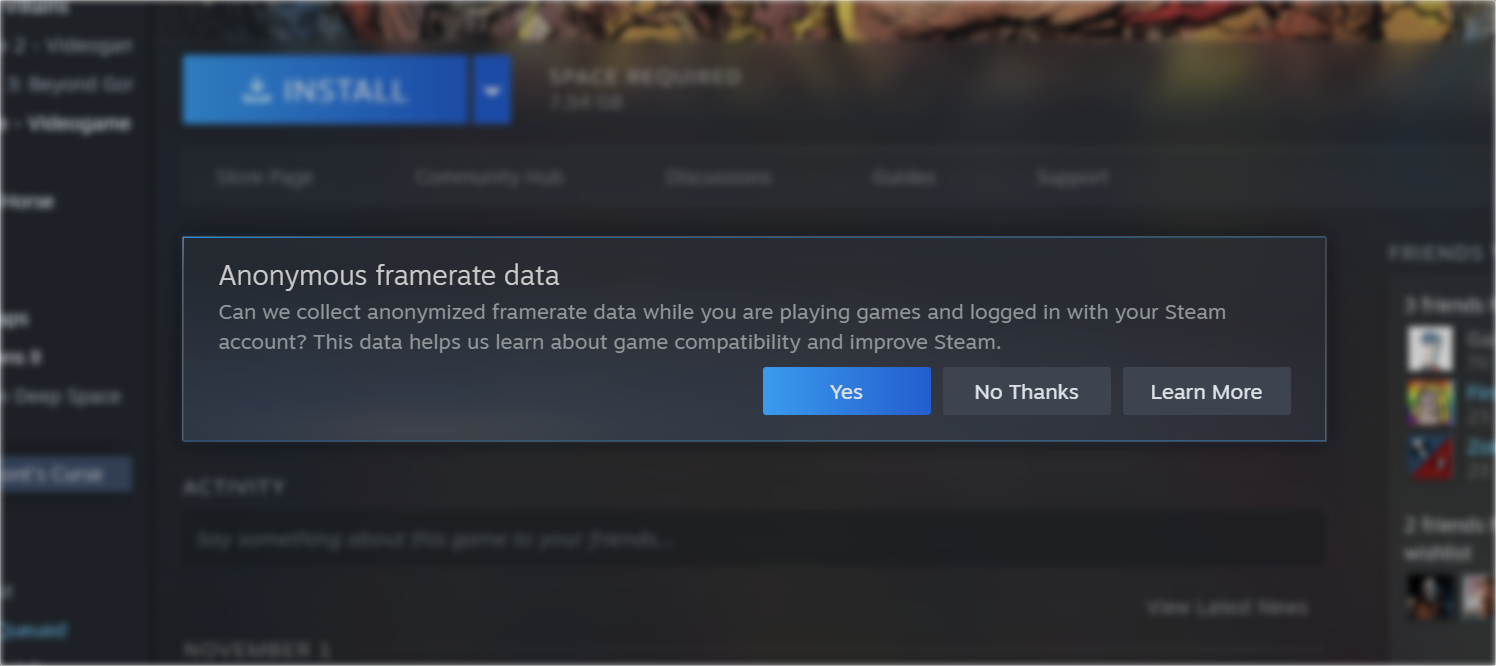
- Framerate reporting is based on an opt-in prompt that appears in your Steam Library asking "Can we collect anonymized framerate data while you are playing games and logged in with your Steam account?"
- You can change that choice at any time from Steam Account Settings > Data & Browsing > Anonymous Game Framerate Data without needing to find the original prompt again.
- Valve says a majority of Steam Deck players have already opted in across a wide range of games and play styles, which is why the sample pool is large enough to publish for thousands of titles at launch.
- Games with too few reporting sessions won't show an average yet; Valve has set a minimum data threshold before it will generate and display a distribution for a title, so very new or niche releases may take time to populate.
What's Next for the Feature
Valve describes this as "a stepping stone toward providing framerate data for more devices than just Steam Deck." The desktop side of that expansion is already underway: Steam Client Beta users on PC are now being prompted to opt in to anonymous framerate reporting too, ahead of a wider rollout to all desktop customers. Once that data starts populating, the same kind of histogram could eventually help PC shoppers weigh a game's real-world performance across a far wider range of hardware than a single handheld.
For now, anyone checking performance on Steam Deck has a genuine, player-sourced number and a breakdown to weigh against the Verified checkmark, rather than having to guess from forum anecdotes before they click buy. Pair it with the Store page's existing Verified, Playable, or Unsupported rating and you get a much more complete picture of what a game will actually feel like once it's installed.
Official links
Lena tests the hardware that games run on, from handheld thermals to controller latency. If a spec sheet is doing something suspicious, she has already opened the device.