How to Prepare Your PC for Gears of War: E-Day Before Early Access Begins
Gears of War: E-Day now requires a ray-tracing GPU and 115GB of SSD space. Here is how to set DLSS 4.5, Reflex and Resizable BAR before Early Access opens.
Pre-installs for Gears of War: E-Day opened on September 29, and Early Access begins October 1, five days before the worldwide launch on October 6. The Coalition used this week's gold announcement to publish the game's final PC specifications, and one line in that chart changes the calculus for a lot of players: a hardware ray-tracing capable GPU is not a recommendation here, it is a hard requirement. If your graphics card predates ray tracing, the game will not run at all. Here is what the specs actually demand, and how to configure DLSS 4.5, Reflex and the rest of the PC feature set before you load in.
Why Ray Tracing Is No Longer Optional
According to The Coalition's official specifications, Gears of War: E-Day is built on Unreal Engine 5.8 and leans on Lumen for ray-traced global illumination and ambient occlusion, plus MegaLights for ray-traced shadows drawn from up to 100 light sources at once. Both systems assume hardware ray-tracing cores are present on the GPU, which is why cards without them are locked out rather than just running at reduced settings. The studio also confirmed RTX Mega Geometry support, which extends ray tracing to Nanite's ultra-detailed geometry for the first time in the series, adding more accurate reflections and ray-traced shadows on objects that would previously have used cheaper approximations.
Practically, that means checking your GPU generation before anything else. NVIDIA cards from the RTX 20-series onward qualify; on the AMD side you need RX 6000-series or newer. If you're on an older GTX or RX 5000-series card, no driver update or settings tweak will get E-Day running.
Minimum, Recommended and 4K Ultra Targets
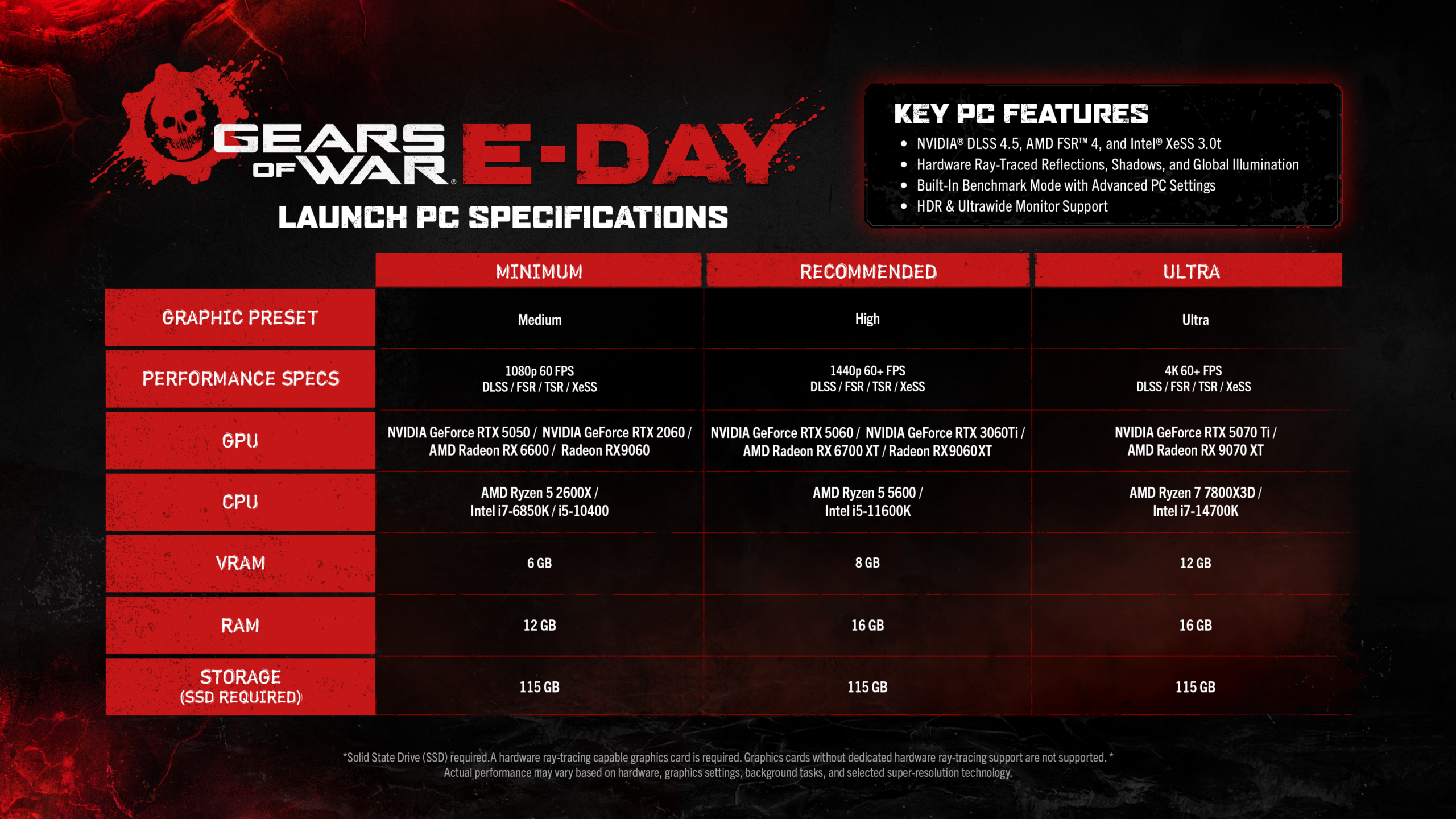
The final chart lists three tiers. At minimum, The Coalition specifies a Ryzen 5 2600X or equivalent CPU paired with an RTX 2060 or RX 6600, aimed at 1080p at lower settings. The recommended tier steps up to a Ryzen 5 5600 with an RTX 3060 Ti or RX 6700 XT for a steadier 1080p-to-1440p experience. For 4K at Ultra settings, The Coalition points to an RTX 5070 Ti or RX 7900 XT. Every tier assumes an SSD: the install takes 115GB regardless of which quality preset you plan to run, and the studio has been explicit that a mechanical hard drive is not supported for this build.
Before you touch a single slider, confirm your free space. A full pre-install plus any day-one patch can comfortably push past 130GB, and Early Access starts October 1 whether or not your download has finished.
Setting Up DLSS 4.5, Frame Generation and Reflex
E-Day is one of the launch titles for NVIDIA's GeForce RTX technology partnership, which means DLSS 4.5 Super Resolution and Dynamic Multi Frame Generation are built into the graphics menu rather than bolted on after launch. The practical order to work through, in the game's own settings rather than the NVIDIA app, is: turn on DLSS Super Resolution first and leave it on Quality mode, then check your frame counter. If you're still short of your target refresh rate, step down to Balanced and then Performance one notch at a time, checking image clarity at each stage before going further. Only reach for Multi Frame Generation once your base rendered frame rate is already stable — generated frames amplify a smooth baseline, they don't fix a stuttering one.
For competitive multiplayer specifically, keep NVIDIA Reflex enabled and leave frame generation off. Reflex trims the render queue to cut input lag, and stacking generated frames on top of it in a fast-paced shooter adds latency between your mouse movement and what appears on screen, even as the on-screen counter climbs. The Coalition's own PC breakdown frames Reflex as core to the versus experience for exactly this reason, not just a checkbox for single-player.
AMD and Intel owners aren't left out: the game natively integrates FSR and XeSS 3.0 alongside Unreal Engine's own TSR, so the same tier-down approach applies regardless of GPU vendor.
Driver Prep and Resizable BAR
NVIDIA shipped GeForce Game Ready Driver 617.14 ahead of E-Day's window specifically to cover the game alongside CONTROL Resonant, The Witcher 3: Wild Hunt — Remastered and AION 2. Install it, or a newer WHQL driver, before your first launch rather than after a crash. Also confirm Resizable BAR is switched on both in your motherboard's BIOS and in the NVIDIA Control Panel; with ray tracing mandatory and Nanite geometry streaming constantly, a disabled BAR shows up as inconsistent frame pacing and stutter that's easy to mistake for a settings problem when it's actually a firmware one.
The Coalition has also built in Advanced Shader Delivery, which precompiles shaders ahead of time to cut down on the first-run stutter that hits so many Unreal Engine 5 releases in their opening hour. Expect a short shader-compilation pass the first time you launch after installing or updating drivers; let it finish rather than alt-tabbing out.
“Gears of War: E-Day is being built to deliver a cinematic, visceral, and technically ambitious return to the origins of the franchise.”Mike Perzel, Rendering Lead, The Coalition

Pre-Install Timing and What Changes at Each Stage
Pre-installs opened September 29 at 8am Pacific (15:00 UTC) across Xbox Series X|S, Xbox on PC and Steam. Premium Edition owners can start playing on October 1 at the same time, up to five days ahead of everyone else, while Game Pass Ultimate and PC Game Pass members join at worldwide launch on October 6. Mike Crump, Studio Head at The Coalition, tied the milestone directly to the studio's history with the franchise in his gold announcement, and the specs release was timed to give PC players a full week to sort out hardware questions before a single mode goes live.
- Confirm your GPU has dedicated ray-tracing hardware — this is a hard gate, not a setting.
- Free up at least 115GB on an SSD; a mechanical drive is not supported.
- Update to GeForce driver 617.14 or newer, or the equivalent current AMD/Intel driver.
- Enable Resizable BAR in BIOS and in your GPU control panel.
- Set DLSS/FSR/XeSS to Quality first, then step down only if needed; keep Reflex on and frame generation off for Versus.
None of this requires touching the NVIDIA app's global overrides — every setting that matters here lives inside E-Day's own graphics menu, which is the version The Coalition tuned and tested. Get through this list before pre-install finishes downloading, and Emergence Day should run the way the studio intended when Early Access opens on October 1.
Official links
Lena tests the hardware that games run on, from handheld thermals to controller latency. If a spec sheet is doing something suspicious, she has already opened the device.