Sony's PS Portal Update 7.1.7 Caps Charging at 80% to Protect Battery Health
PS Portal's newest firmware defaults to an 80% charge limit for long-term battery health and now requires PlayStation Link devices to update in step.

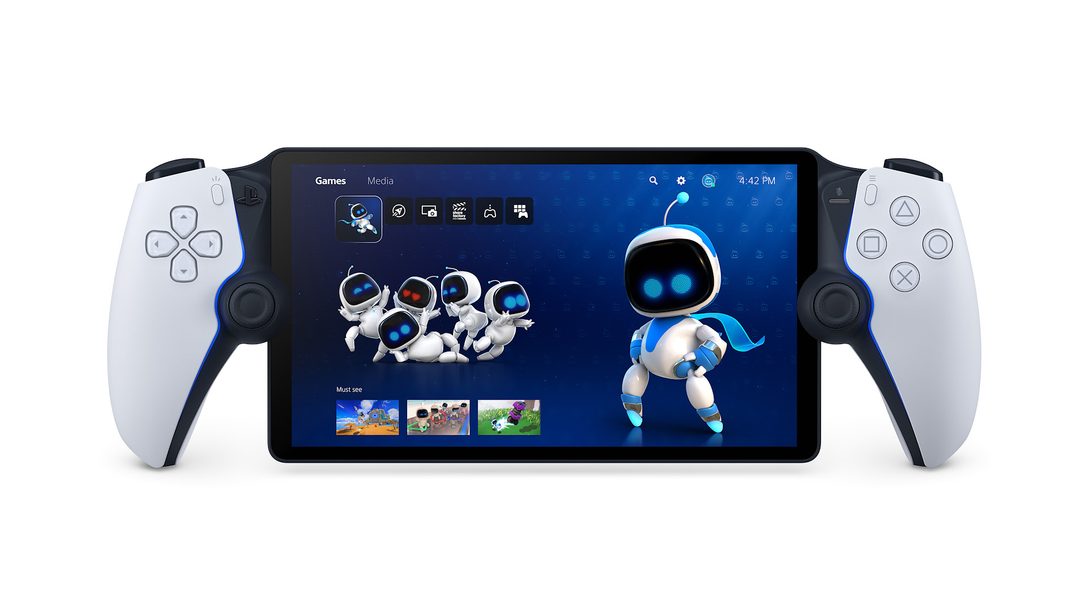
Sony has rolled out a new system software update for the PlayStation Portal remote player, and unlike most of the handheld's past updates, this one is not about adding a feature you will notice while playing. Version 7.1.7, which began reaching devices on September 24, changes how the Portal manages its own battery, and it quietly makes a second device a requirement for anyone using PlayStation's wireless audio gear with it.
An 80% charge limit, on by default
According to Sony's own PS Portal system software update page, update 7.1.7 "introduces changes to how your PS Portal charges in order to support the long-term battery health of your device." Once the update installs, the Portal will stop charging at 80% capacity by default rather than topping out at 100% every time it is plugged in.
Players who want the old behavior back can still get it. The limit is adjustable in Settings > System > Battery, where Sony now exposes a slider for how high the Portal is allowed to charge. The company is explicit that pushing past 80% is a tradeoff: according to the same support page, choosing a higher limit "might impact battery performance and overall stability" over the life of the device.
Why a streaming handheld needs this now
The Portal has no games installed locally, no onboard storage for saves and nothing resembling a traditional battery-draining workload; it exists purely to stream a PS5's video and audio over Remote Play or Sony's Cloud Streaming Beta to a screen in your hands. That makes it, in practice, plugged in almost constantly during long sessions and left charging on a nightstand or dock between them, which is exactly the kind of near-permanent full charge that most lithium-ion batteries handle badly over years of use.
Phone and laptop makers have leaned on the same fix for years, and Sony has already applied it once on this exact device: the Portal's March 2026 update introduced a similar charge-health option alongside a new 1080p High Quality streaming mode. Version 7.1.7 goes further by making a protective limit the default state for every device that installs it, rather than a setting players had to find and switch on themselves.
The PlayStation Link catch
The update carries a second change that is easy to miss in the patch notes but will matter immediately to some owners: any accessory running on PlayStation Link, Sony's low-latency wireless audio protocol, now needs to be updated to its latest firmware to keep working with the Portal. That covers the Pulse Elite wireless headset and Pulse Explore wireless earbuds, the two audio products Sony designed around Link alongside the Portal and PS5 itself.
Sony's guidance is to connect the headset or earbuds to a PS5 or a PC with the PlayStation Link PC driver installed and run the update there before pairing back up with the Portal. Skip that step and the accessory simply will not connect over Link until it is brought current, which turns what looks like a minor firmware bump into a mandatory checklist for anyone using the full Portal-plus-Link audio setup.

Smaller changes rounding out 7.1.7
Outside the battery and Link changes, Sony's notes describe the rest of 7.1.7 in the terms it usually reserves for maintenance releases: "improved system software performance and stability," plus cleanup to "the messages and usability on some screens." No new streaming modes, UI redesigns or store features are listed this time, which fits a release that is really about the hardware's long-term health rather than what shows up on screen during a session.
What Portal owners should do
The update installs the way every Portal system update does, through the device's own Settings menu once it detects the new version is available, and Sony's standing guidance is to install system updates as soon as they appear rather than delay them. Owners who run Pulse Elite or Pulse Explore gear through PlayStation Link should treat the accessory update as part of the same job, not an optional follow-up, since a Portal on 7.1.7 will not talk to an out-of-date Link device until it is updated too.
For most players the visible change will be small: the battery indicator simply stops climbing past 80% unless they go looking for the setting that lets it. But it is a notable shift in how Sony is treating the Portal almost two years after launch, less as a one-off streaming gadget and more as hardware worth protecting for the long haul.
Official links
- PlayStation Support: PS Portal system software update detailsplaystation.com
- PlayStation Support: updating PS Portal system softwareplaystation.com
- PlayStation Portal Remote Player product pageplaystation.com
- PlayStation Link PC Driver supportplaystation.com
- Wikipedia: PlayStation Portalen.wikipedia.org
Lena tests the hardware that games run on, from handheld thermals to controller latency. If a spec sheet is doing something suspicious, she has already opened the device.